How to disable old security protocols

How to disable old security protocols

Some SwissInfoCloud services may not work with old security protocols. We recommend turning them off.

Windows

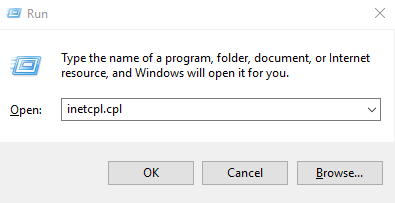
·         Click Windows + R

·         Write inetcpl.cpl and Enter

·         In the window, select the last tab. Advanced.

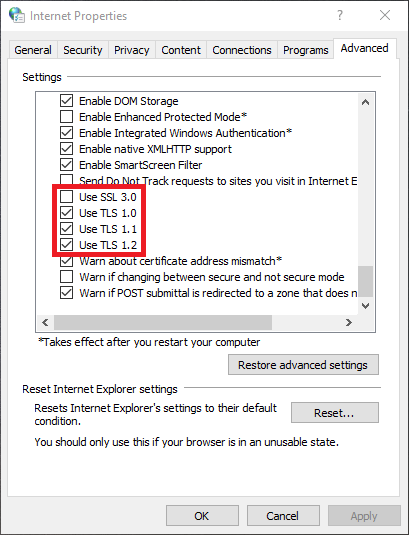
·         In the Security category make sure that:

o   security protocols are disabled:

-  SSL 2

-  SSL 3

o   security protocols are enabled:

-  TLS 1.0

-  TLS 1.1

-  TLS 1.2
Hasznosnak találta ezt a választ?

 Kinyomtatja ezt a cikket

Ezenkívül olvassa el

How to Print locally from a Remote Desktop Connection

For printing on local printer douments opened on remote desktop  you have to Enable Printer as a...

Installation of FortiToken Mobile

1. Go to Store2. In the search box, type "fortitoken mobile" and choose the app FortiToken...

SafeOffice advantages vs Local Computer

SafeOffice secutity level is very high  Multilevel network protection system High Availability...

Allowed safe software in SafeOffice (remote desktop)

Allowed safe software in SafeOffice (remote desktop):Office Software Microsoft Office Pro plus...

How to configure proxy ip address

To configure proxy IP address, please follow steps:1. Run Internet Explorer 2. In the upper right...