How to add keyboard layout
To add keyboard layout, please follow these steps:
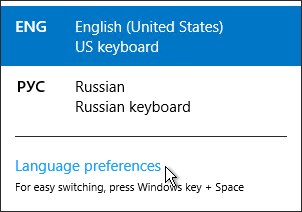
1) Right click on language bar
2) Language preferences
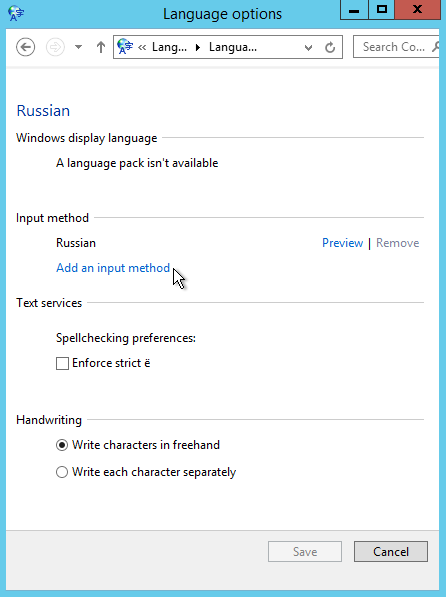
3) Find wanted language and press option
4) Input method -> add input method
5) Choose wanted layout.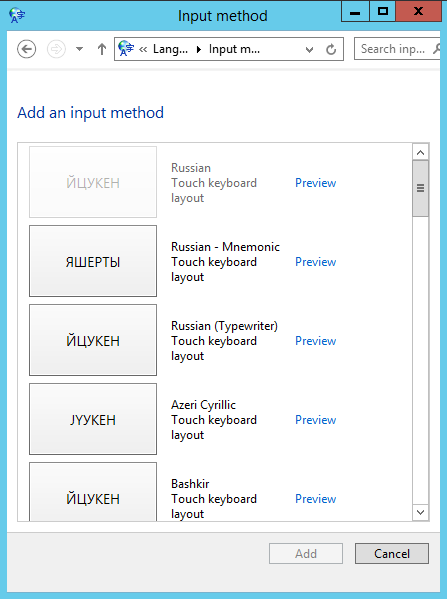

To add keyboard layout, please follow these steps:
1) Right click on language bar
2) Language preferences
3) Find wanted language and press option
4) Input method -> add input method
5) Choose wanted layout.
How to disable old security protocols Some SwissInfoCloud services may not work with old...
Allowed safe software in SafeOffice (remote desktop):Office Software Microsoft Office Pro plus...
To change regional settings including short date, long date, short time, long time, first day of...
1. Go to Store2. In the search box, type "fortitoken mobile" and choose the app FortiToken...
SafeOffice secutity level is very high Multilevel network protection system High Availability...