How to add keyboard layout
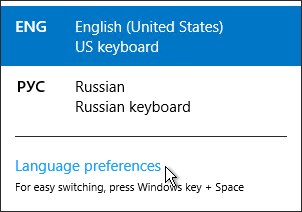
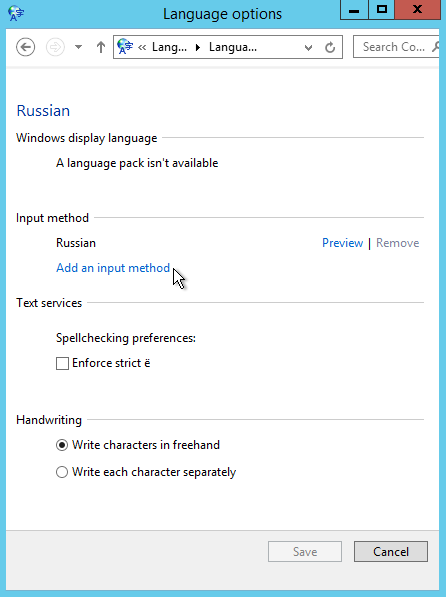
To add keyboard layout, please follow these steps:
1) Right click on language bar
2) Language preferences
3) Find wanted language and press option
4) Input method -> add input method
5) Choose wanted layout.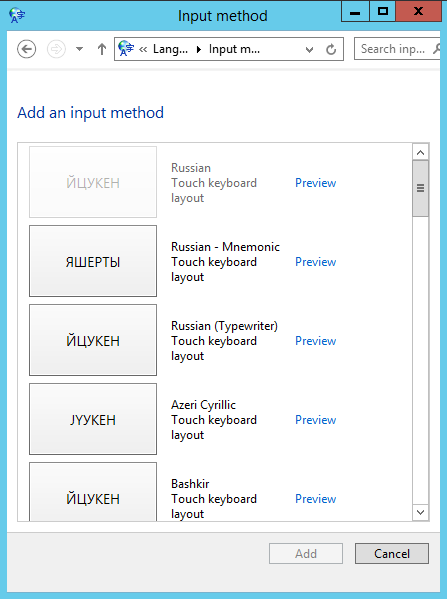

To add keyboard layout, please follow these steps:
1) Right click on language bar
2) Language preferences
3) Find wanted language and press option
4) Input method -> add input method
5) Choose wanted layout.
SafeOffice secutity level is very high Multilevel network protection system High Availability...
To change regional settings including short date, long date, short time, long time, first day of...
The server site of "Swift chat" doesn't save your conversations.However,it can be saved lacally...
To configure proxy IP address, please follow steps:1. Run Internet Explorer 2. In the upper right...
The limit is set to 25mb