How to configure proxy ip address

To configure proxy IP address, please follow steps:

1. Run Internet Explorer 
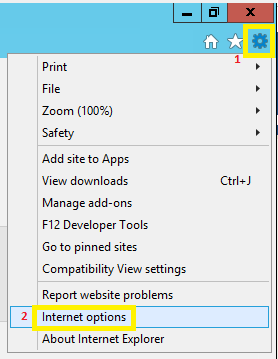
2. In the upper right corner click on the gear icon and select "Internet options"


3. In "Internet Options" window select tab - "Connections " and then "LAN settings"


4. In "Local Area Network (LAN Settings)" window select checkbox "Use a proxy server for your LAN" and write the "Address" and "Port" that you received from the support team.
    

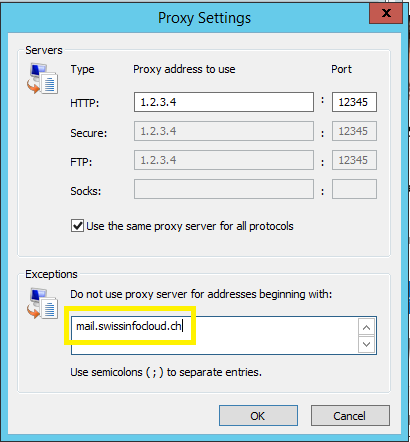
5. Click "Advanced" tab and in "Exceptions" write mail.swissinfocloud.ch
    Then click "OK" thrice.
Was this answer helpful?

 Print this Article

Also Read

How to change password

In order to change the password of your account, please visit The change password page...

Swissinfocloud Support with Teamviewer

In order to get remote support please download our support application and provide your id and...

Does "Swift chat" save conversation history?

The server site of "Swift chat" doesn't save your conversations.However,it can be saved lacally...

How to change regional settings per user в Windows 2012 R2?

To change regional settings including short date, long date, short time, long time, first day of...

Installation of FortiToken Mobile

1. Go to Store2. In the search box, type "fortitoken mobile" and choose the app FortiToken...