How to configure proxy ip address

To configure proxy IP address, please follow steps:

1. Run Internet Explorer 
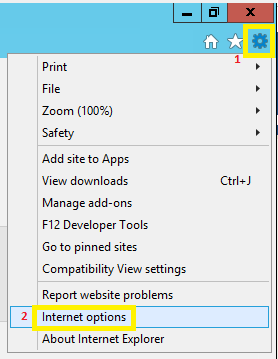
2. In the upper right corner click on the gear icon and select "Internet options"


3. In "Internet Options" window select tab - "Connections " and then "LAN settings"


4. In "Local Area Network (LAN Settings)" window select checkbox "Use a proxy server for your LAN" and write the "Address" and "Port" that you received from the support team.
    

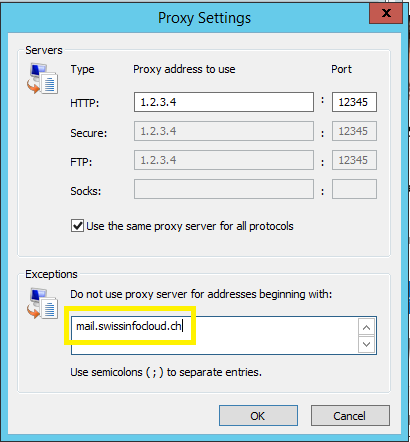
5. Click "Advanced" tab and in "Exceptions" write mail.swissinfocloud.ch
    Then click "OK" thrice.
آیا این پاسخ به شما کمک کرد؟

 پرینت این مقاله

در همین زمینه

Swissinfocloud Support with Teamviewer

In order to get remote support please download our support application and provide your id and...

How to add keyboard layout

To add keyboard layout, please follow these steps:1) Right click on language bar2) Language...

Allowed safe software in SafeOffice (remote desktop)

Allowed safe software in SafeOffice (remote desktop):Office Software Microsoft Office Pro plus...

What is the maximum size of email attachments on SwissInfoCloud?

The limit is set to 25mb

How to change password

In order to change the password of your account, please visit The change password page...