How to configure proxy ip address

To configure proxy IP address, please follow steps:

1. Run Internet Explorer 
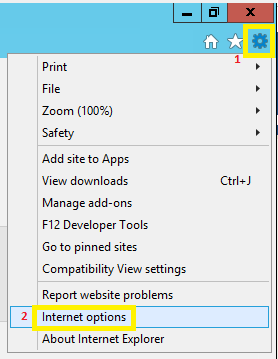
2. In the upper right corner click on the gear icon and select "Internet options"


3. In "Internet Options" window select tab - "Connections " and then "LAN settings"


4. In "Local Area Network (LAN Settings)" window select checkbox "Use a proxy server for your LAN" and write the "Address" and "Port" that you received from the support team.
    

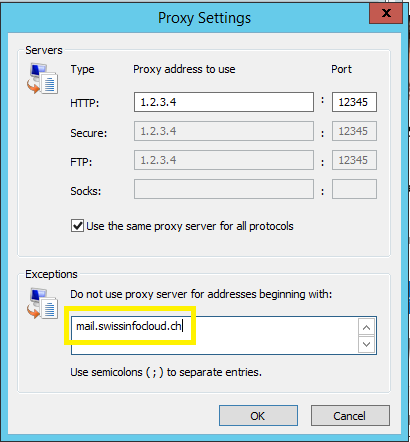
5. Click "Advanced" tab and in "Exceptions" write mail.swissinfocloud.ch
    Then click "OK" thrice.
Bu cevap yeterince yardımcı oldu mu?

 Bu dökümanı yazdır

Also Read

SafeOffice advantages vs Local Computer

SafeOffice secutity level is very high  Multilevel network protection system High Availability...

How to change regional settings per user в Windows 2012 R2?

To change regional settings including short date, long date, short time, long time, first day of...

Installation of FortiToken Mobile

1. Go to Store2. In the search box, type "fortitoken mobile" and choose the app FortiToken...

How to change password

In order to change the password of your account, please visit The change password page...

How to disable old security protocols

How to disable old security protocols Some SwissInfoCloud services may not work with old...