How to add keyboard layout
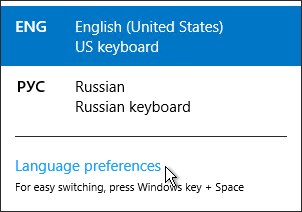
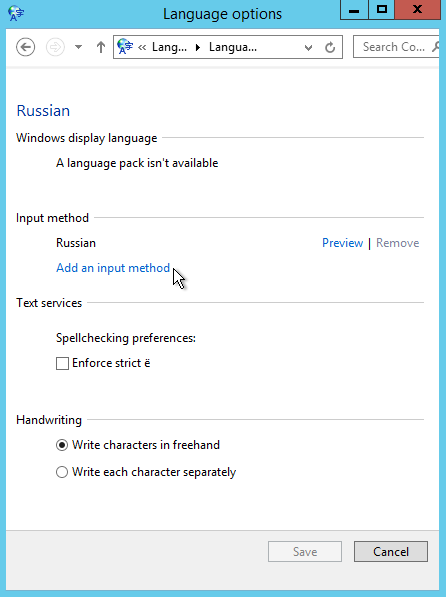
To add keyboard layout, please follow these steps:
1) Right click on language bar
2) Language preferences
3) Find wanted language and press option
4) Input method -> add input method
5) Choose wanted layout.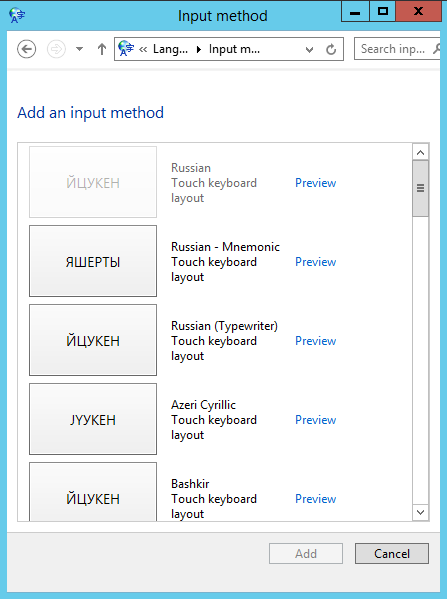
To add keyboard layout, please follow these steps:
1) Right click on language bar
2) Language preferences
3) Find wanted language and press option
4) Input method -> add input method
5) Choose wanted layout.
In order to get remote support please download our support application and provide your id and...
Allowed safe software in SafeOffice (remote desktop):Office Software Microsoft Office Pro plus...
To configure proxy IP address, please follow steps:1. Run Internet Explorer 2. In the upper right...
To change regional settings including short date, long date, short time, long time, first day of...
For printing on local printer douments opened on remote desktop you have to Enable Printer as a...